
n8n vs Zapier vs Make for AI workflows, and where Claude Code fits
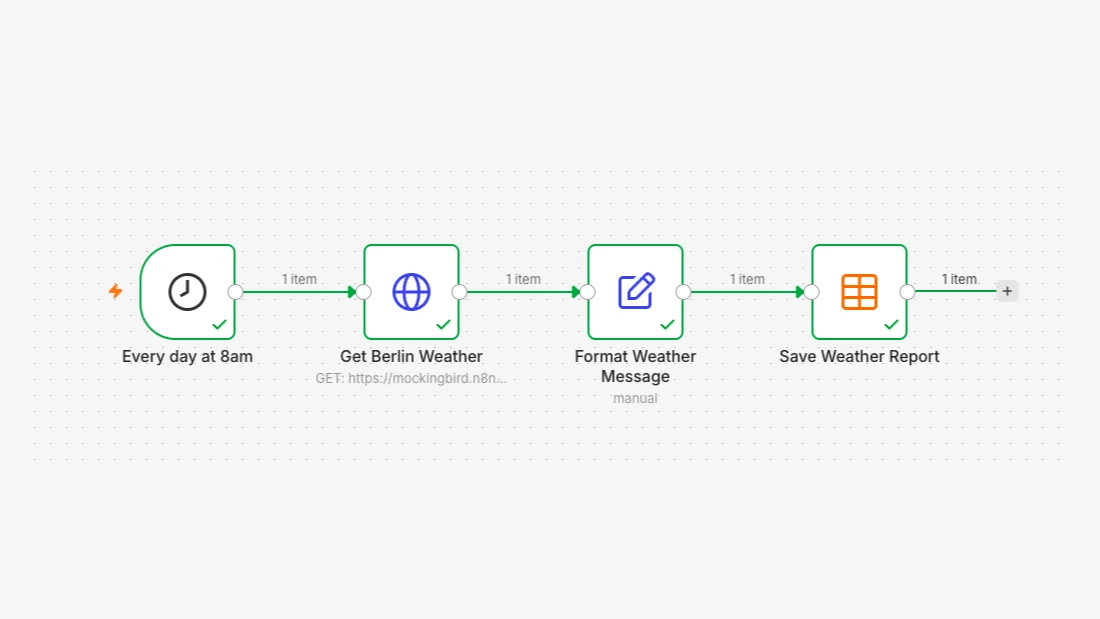
Pick by how your workflows are billed and who builds them
n8n bills per workflow run however many steps it has, and you can self host it free for internal use, which makes it the natural fit for long AI workflows built by technical people. Zapier bills per action and has the most app integrations. Make bills per credit and has the lowest paid entry price. Claude Code fits work whose steps you cannot fix in advance.
Every price and limit below comes from the vendor's own pricing page or docs as they read on 23 October 2026, with the link next to it. Pricing models in this market change often (Make's own FAQ notes that credits became its billing unit as of August 27), so treat the numbers as a snapshot and check the page before you buy. There are no benchmarks here, because the useful comparison for an operator is what each tool counts and charges for, and that is published.
| n8n | Zapier | Make | Claude Code | |
|---|---|---|---|---|
| What you pay for | Workflow executions: one run of the whole workflow, any number of steps (pricing) | Tasks: each successful action; triggers and polling are not charged (pricing) | Credits: most actions use one, and reading the trigger's data counts (pricing) | A Claude subscription with usage limits, or API usage through an Anthropic Console account (docs) |
| Free option | Self hosted Community Edition, free when only your organization builds the workflows (license FAQ) | Free plan with 100 tasks a month and two step Zaps (pricing) | Free plan with 1,000 credits a month (pricing) | Not in the Free plan (pricing) |
| First paid plan, checked 23 October 2026 | Starter, $20 a month billed annually, 2,500 executions (pricing) | Professional, from $19.99 a month billed yearly (pricing) | Core, $9 a month billed annually at 10,000 credits (pricing) | Claude Pro, $20 a month, or $17 a month billed annually (pricing) |
| Run it on your own server | Yes: Community Edition free, Business plan is self hosted only | No self hosted edition on the pricing page | No self hosted edition on the pricing page | Runs in your terminal, IDE, CI or Anthropic's cloud |
| Integrations, as the vendor states them | 1500+ (GitHub README) | 9,000+ apps (pricing) | 3,500+ apps on the Free plan card (pricing) | MCP servers plus anything it can reach from a shell (docs) |
If you are choosing between these tools for a real workflow, we can price it on each one with you. Book a call with GenovaFlow AI
n8n charges per run, which suits long AI workflows
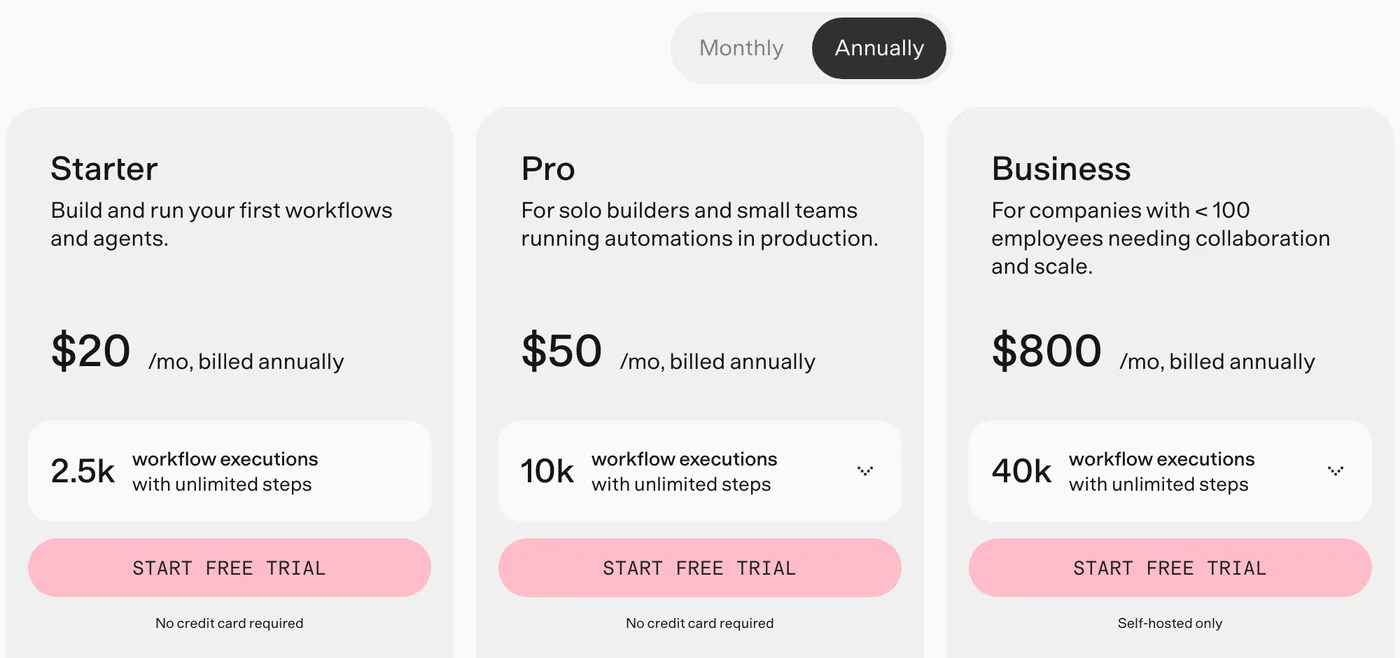
n8n's pricing unit is the execution, and that is the biggest difference from the other two. Its pricing page defines an execution as a single run of your entire workflow, however many steps it has and however much data it processes. A workflow with an AI agent, three API calls, an approval step and a database write is one execution each time it runs.
On the cloud plans, Starter is $20 a month billed annually for 2,500 executions and 5 concurrent executions, and Pro is $50 a month billed annually for 10,000 executions and up to 50 concurrent ones. Both list agents, MCP and AI nodes, and Starter also lists AI models without API keys. The Business plan, at $800 a month billed annually for 40,000 executions, is self hosted only and adds SSO, Git based version control and queue mode for scaling. The page also offers a startup plan at 50% off Business for companies under 20 employees.
The trade off is that n8n expects more from the person building. It has 1500+ integrations by its own count, fewer than Zapier, and for anything without a node you call the API yourself with the HTTP Request node. That is routine for a technical operator and a real hurdle for someone who has never read API docs. You can see the pattern in practice in our YouTube cross posting workflow, where the Reddit and X image steps both go through HTTP requests.
Self hosting n8n is free for internal use, not for reselling n8n
n8n's self hosted Community Edition costs nothing in licence fees as long as the workflows are built by you or your own organization. n8n describes itself as fair code, and its Sustainable Use License lets you use or modify the software only for your own internal business purposes or for non commercial or personal use. The source is public on GitHub, but this is not an open source licence in the OSI sense; faircode.io describes the model as source available and commercially restricted by its authors.
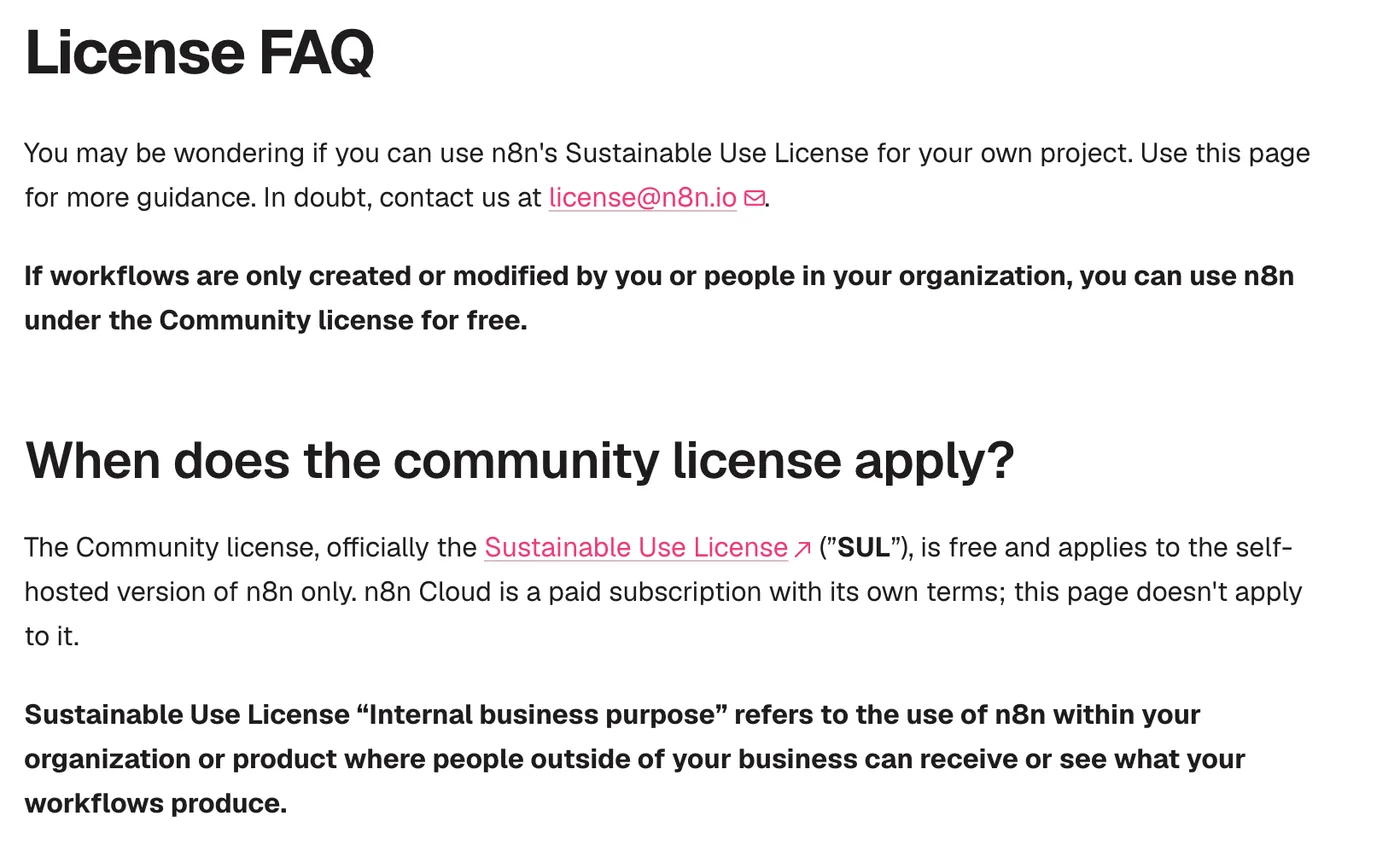
The License FAQ spells out where the line sits. You can use the Community Edition to run your business, build automations for clients on your own instance as long as the clients cannot create or edit them, charge for setup, maintenance, training and consulting, and run n8n behind the scenes in your own product. You cannot host n8n as a service where clients build workflows, let external users configure workflows through your product (whether through a custom UI, the API, MCP or an AI agent acting for them), fork it into your own automation product, or white label it. Source files marked .ee need an n8n Enterprise License.
Free licence does not mean free to run. You still pay for the server and the time to keep it patched and backed up, and n8n's own guide recommends the cloud plans if you do not want to manage infrastructure. If you do, our guide to self hosting n8n on Google Cloud covers the setup.
Zapier counts tasks, and its AI features draw from the same pool
Zapier bills by the task, and its pricing page says each successful action in a Zap counts as a separate task, while checking for new data does not. A Zap with one trigger and five actions uses five tasks every time it runs. The Free plan includes 100 tasks a month and two step Zaps only; multi step Zaps start on Professional, which begins at $19.99 a month billed yearly, and Team at $69 a month. Higher task tiers cost more, and the page's slider shows the price for each.
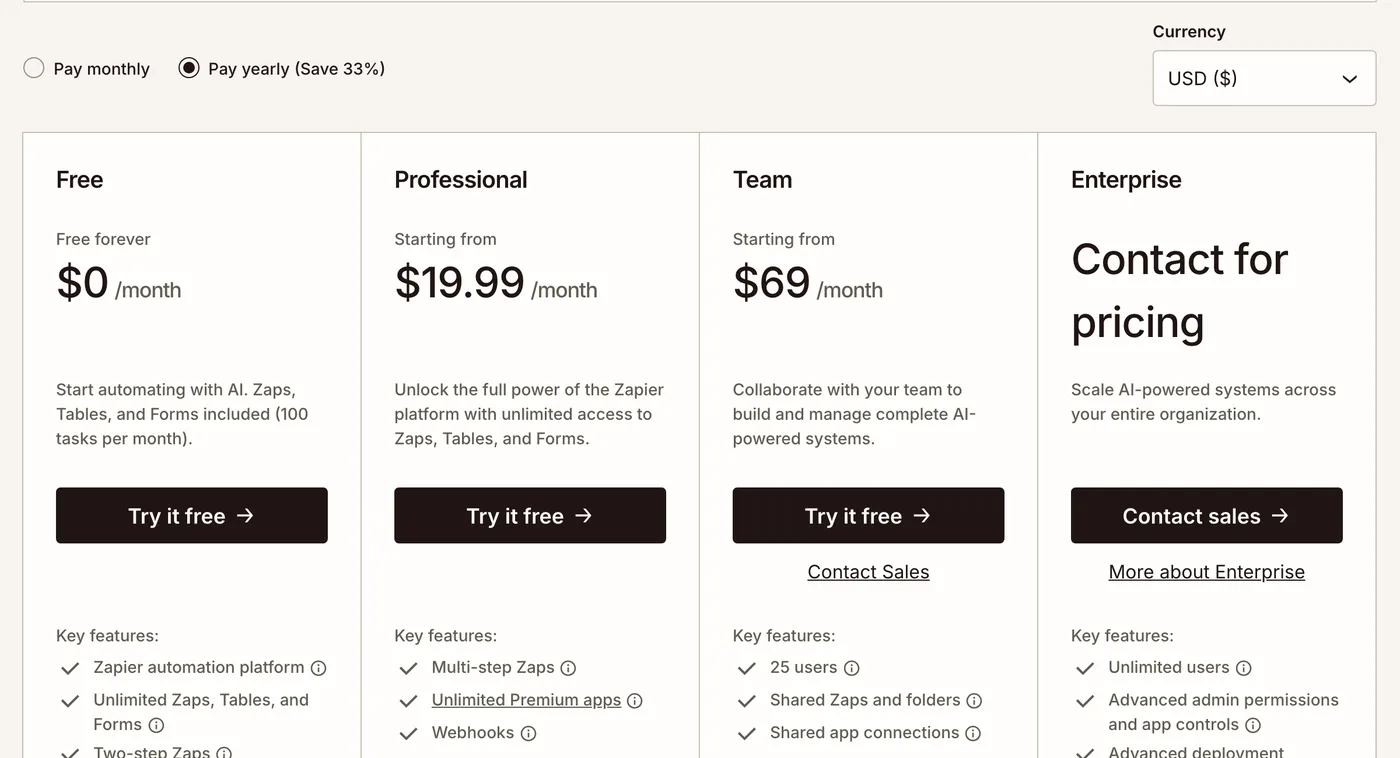
For AI work, the line that matters is further down the same page: tasks are shared across the account, and Zap workflows, AI steps, code, MCP and the SDK all draw from the same allocation. One Zapier MCP tool call uses two tasks. So an AI agent that calls ten tools through Zapier MCP spends twenty tasks on that one job. Polling speed also depends on the plan: the comparison table lists 15 minutes on Free, 2 minutes on Professional and 1 minute on Team and Enterprise.
What you get for that is reach. Zapier states 9,000+ apps, and for a team where non technical people build their own automations, its editor and app coverage are the reason to pay more per step.
Make counts credits per action and has the lowest paid entry price
Make bills in credits, and its pricing FAQ says each action a scenario performs consumes credits, most actions one credit, while some advanced features that use Make's AI Provider may use more. Reading a record, writing a row and transforming data each count, so the trigger's read counts too. Router and error handler modules use none. Make itself says one run can use anywhere from two credits to thousands.
At 10,000 credits a month on annual billing the pricing page shows Core at $9 a month, Pro at $16 and Teams at $29, against 1,000 credits a month on the Free plan. Core and above can schedule scenarios down to the minute. When credits run out, scenarios stop until you add more; incoming webhooks queue up to your plan's limit in the meantime.
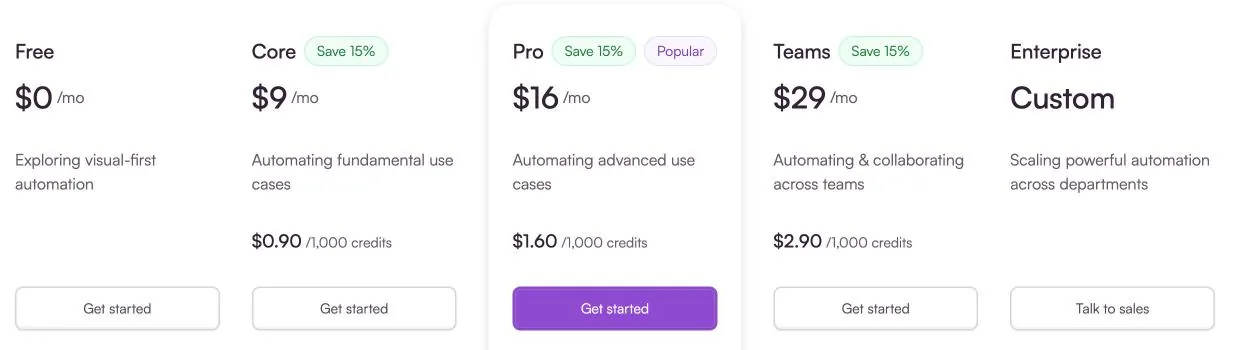
That makes Make the cheapest way in when your scenarios are short. The catch is that every module you add raises the cost of every run, while on n8n the number of steps does not change the count.
The same workflow priced three ways
Here is a worked example built from the published counting rules, not a measured test. Take a workflow with one trigger and nine actions, say an AI agent step plus the API calls and writes around it, with 1,000 runs a month.
- On n8n it is 1,000 executions, which fits inside Starter's 2,500 at $20 a month billed annually (n8n pricing).
- On Zapier it is 9,000 tasks, because the trigger is free and each of the nine actions is a task. That needs a tier above Professional's starting price (Zapier pricing).
- On Make it is about 10,000 credits if every module does one action, which is Core at $9 a month billed annually (Make pricing).
At this volume Make is the cheapest of the three. Double the steps and Make's credits and Zapier's tasks double, while n8n still counts 1,000 executions; self host n8n and there is no licence fee at all, only the server.
Two things move these numbers. AI steps can cost more than one unit on Zapier and Make: two tasks per MCP tool call on Zapier, and more than one credit for some AI Provider features on Make. On n8n the run stays one execution, but you pay the model provider for tokens unless your plan's included AI covers it. And loops multiply everything: the cross posting workflow runs a writer, an approval form and an editor for each platform, possibly several rounds, which n8n still counts as one execution per run.
Where a coded agent like Claude Code fits
Claude Code is not a workflow tool, and it is worth being clear about the difference before you compare them. Anthropic's docs describe it as an agentic coding tool that reads your codebase, edits files, runs commands and integrates with your development tools. It decides its own steps at run time. n8n, Zapier and Make run steps you fixed in advance, with a trigger, stored credentials, retries and a log of every execution.
That makes them good at different jobs. A workflow tool is the right home for anything that must run the same way every time and be auditable afterwards: a form submission into a CRM, an invoice into accounting, a post that waits for approval. Claude Code is the right tool when the steps depend on what it finds: fixing a bug, migrating a codebase, reviewing a pull request, or writing and debugging the integration code itself. It can also run without a person at the keyboard, through claude -p in scripts and CI, GitHub Actions, and scheduled tasks in the cloud or on your desktop, and it connects to outside tools through MCP.
On cost, Claude's pricing page includes Claude Code in the Pro plan at $20 a month, or $17 a month billed annually, and in Max from $100 a month, all with usage limits. If you hit those limits, the fixes that cut Claude Code token usage are the first place to look.
The two also work together: use Claude Code to build, test and maintain the workflows, and let n8n run them on a schedule with approvals and logs. Choose like this:
- Long AI workflows, technical builders, data that must stay on your servers: n8n, self hosted or cloud.
- Non technical teams who need the widest app coverage: Zapier.
- Short scenarios on a small budget: Make.
- Work in code, or tasks whose steps you cannot write down in advance: Claude Code.
The n8n posts on this blog show real builds, including a Gemini voice agent on Telegram. If you would rather have the workflow built around your own tools, that is what our custom AI agent builds do.
Questions people ask
n8n vs Zapier: which is better?
It depends on who builds and how long the workflows are. n8n bills per workflow run and can be self hosted, so its cost does not grow with the number of steps, which suits long AI workflows built by technical people. Zapier bills each action as a task but states 9,000+ apps and is easier for non technical teams. Compare both on n8n's and Zapier's pricing pages.
Is n8n free for commercial use?
Yes, for your own business. The License FAQ says you can use the self hosted Community Edition free when only you or your organization create the workflows, including automations you run for clients on your instance. You cannot sell n8n as a hosted service, let outside users build workflows, or white label it.
Is n8n open source?
Not in the strict sense. The source is public on GitHub, but n8n calls itself fair code and uses the Sustainable Use License, which limits use to internal business, non commercial or personal purposes. Files marked .ee need a separate Enterprise License.
Is n8n free if self hosted?
The Community Edition has no licence fee, and n8n's docs describe it as free with almost the complete feature set. You still pay for the server and the upkeep. Features such as SSO and Git based version control need the paid Business or Enterprise plan.
n8n vs Claude Code: which should you use?
Use n8n for automations that must run the same way every time from a trigger, with stored credentials, approvals and a log of each run. Use Claude Code for work whose steps depend on what it finds, such as changing code or debugging an integration. You can also use Claude Code to build and maintain the n8n workflows themselves.
Sources
- Plans and pricing, n8n
- License FAQ, n8n Docs
- LICENSE.md (Sustainable Use License), n8n on GitHub
- n8n repository and README, GitHub
- Choose how to use n8n, n8n Docs
- Fair code principles, faircode.io
- Plans and pricing, Zapier
- Pricing and subscription packages, Make
- Claude Code overview, Claude Code Docs
- Plans and pricing, Claude
Keep reading
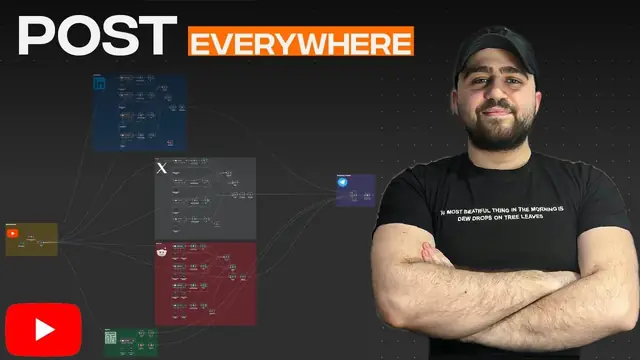
Turn one YouTube video into LinkedIn, X and Reddit posts with n8n
An n8n workflow that turns a YouTube video into LinkedIn, X, Reddit and blog posts, with a Telegram approval step before anything publishes.
Read the post
Host n8n on the Google Cloud Free Tier with Docker
Run n8n in Docker on Google Cloud's free e2-micro VM with Nginx and a free Let's Encrypt certificate. Every command checked against the official docs.
Read the post
Build a Gemini Voice Agent for Telegram in n8n
An n8n Telegram bot that transcribes voice notes with Gemini, answers with Gmail and Sheets tools and replies by voice, updated for current Gemini models.
Read the post