
Claude Code Effort Levels Compared on One New York City Build
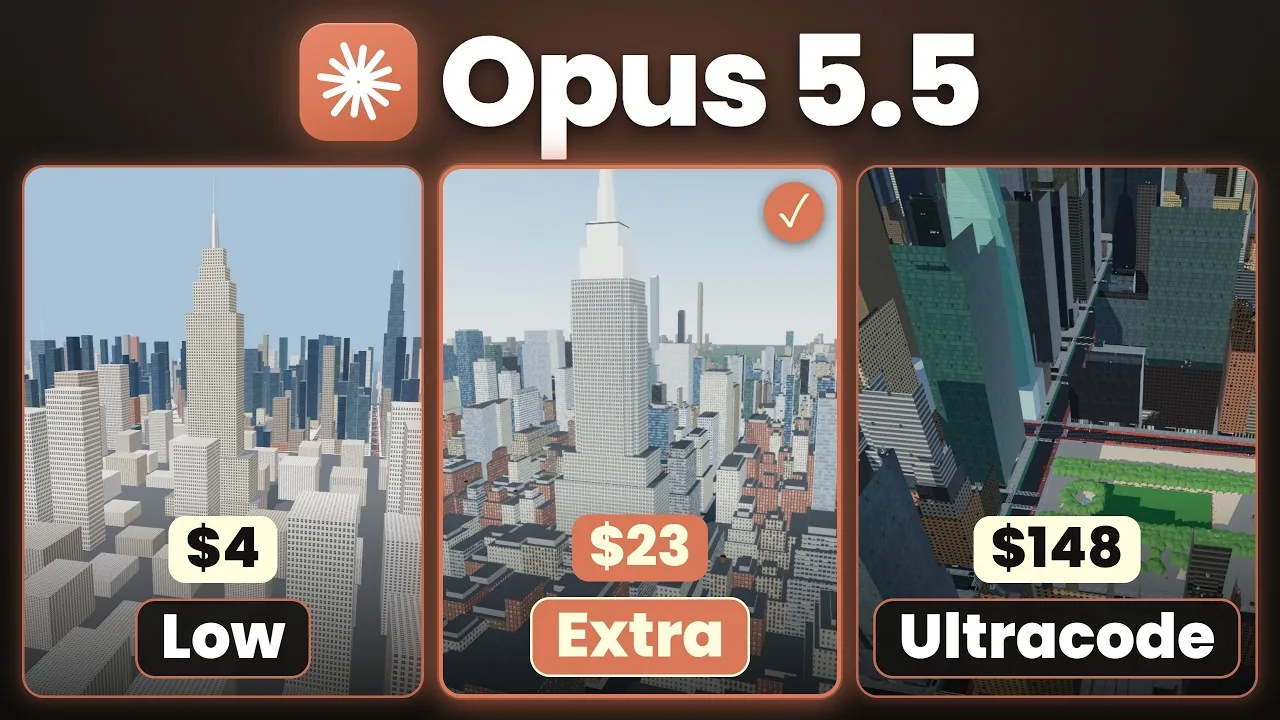
Extra high passed all 20 checks for $23
We gave Claude Code one prompt at all six effort levels on Opus 5.5: build a living 3D New York City we can fly over and walk through in the browser. In our test, extra high passed all 20 checks for $23. Max and Ultracode passed them too, at $45 and $148, without building a better city.
We wanted to know whether the effort setting changes what Claude Code builds or only how long it thinks. So every level got the same prompt in its own fresh session, and every result was scored against the same 20 checks, plus our own look at the city out of 10. The cheapest run took 18 minutes and about $4 and scored 2 out of 10.
Below is what each level did and where the extra money stopped paying for itself. Every number comes from our video Claude Code Built New York City at Every Effort Level.
If you are paying for max on work that extra high would finish, a short call can sort out which level each job needs. Book a call with GenovaFlow AI
Effort decides how much Claude thinks before it acts
Effort is a setting that decides how much Claude thinks before it does the task. Lower effort means fewer tokens, less time and less cost, and lower quality with them. Higher effort is the reverse. Anthropic's Claude Code model configuration page puts it the same way: effort levels control adaptive reasoning, which lets the model decide whether and how much to think on each step, and lower effort is faster and cheaper for straightforward tasks while higher effort gives deeper reasoning for complex problems.
The API side says the setting reaches further than the thinking. Anthropic's effort documentation says it affects all tokens in the response, including text, tool calls and thinking, and that effort is a behavioral signal rather than a strict token budget. The same page says lower effort also means fewer and terser tool calls.
On Opus 5.5 the levels are low, medium, high, extra high (xhigh in the docs) and max, and the default is medium. Ultracode is the odd one out. The docs describe it as a Claude Code setting rather than an effort level: with it on, Claude orchestrates dynamic workflows at whichever effort level the session runs. Our Ultracode run sat on extra high, which is why we describe it as extra high with several agents working at once.
You set the level with /effort in a session, the --effort flag when you launch, or the CLAUDE_CODE_EFFORT_LEVEL environment variable, all listed under set the effort level. Which end you want depends on the job. A small task on a high setting only consumes more tokens for the same output, while a complex task like a whole city needs the extra thinking.
The test: one prompt, six fresh sessions, 20 checks
Every run was Opus 5.5 in its own fresh session, with the same prompt and no questions allowed back. The prompt opens with "Build me a living, realistic 3D New York City that I can fly over and walk through in my browser all in one go without asking me anything", then gives the location, the details to include, street life and normal everyday behaviour for the people, an aerial view in the style of Google Maps, a walking mode, and a few settings for the viewer.
The 20 checks look at what the eye misses in a quick look: how many buildings there are, the quality of the people and the buildings down to the windows compared with real life, and how the people behave. On top of the checks we walked and flew through each city ourselves and gave it a score out of 10, because a build can pass a check and still look wrong.
The runs were one shot. The single exception was medium, which had a loading bug when we first opened it, so we asked for one fix. That is the only follow up in the whole test. The exact prompt every level got is a free download linked at the top of the video description, so you can run the same test on your own plan.
Time, tokens and cost for every effort level
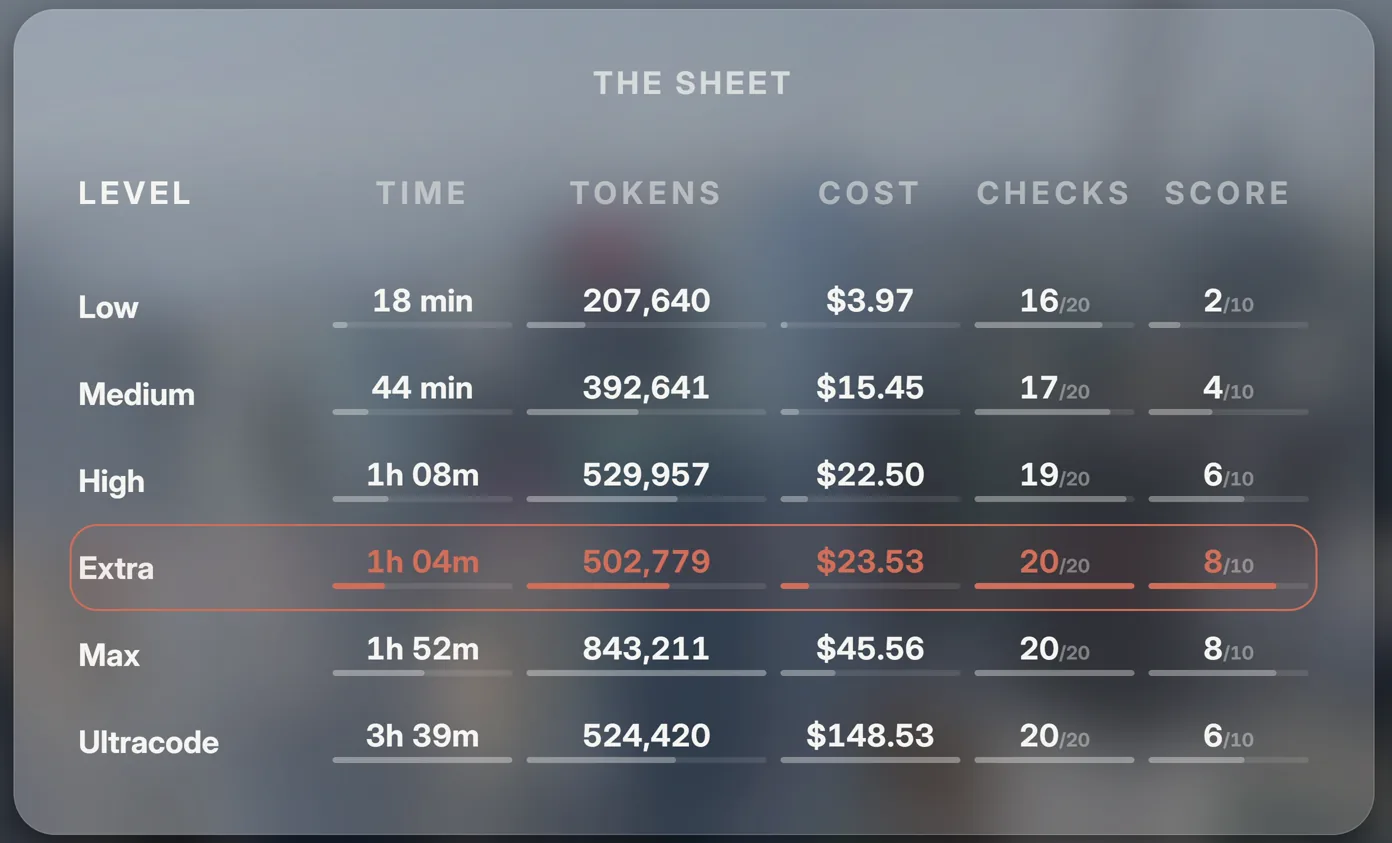
Here is the whole scorecard, with the rounded figures we read out in the video's results sheet. Cost is the API cost of each run, checks are out of 20, and the score is our own out of 10.
| Level | Time | Tokens | Cost | Checks passed | Score |
|---|---|---|---|---|---|
| Low | 18 min | 207K | about $4 | 16 of 20 | 2/10 |
| Medium | 44 min | 400K | $15 | 17 of 20 | 4/10 |
| High | 1 hour | 529K | $22 | 19 of 20 | 6/10 |
| Extra high | 1 h 4 min | 502K | $23 | 20 of 20 | 8/10 |
| Max | 1 h 52 min | 843K | $45 | 20 of 20 | 8/10 |
| Ultracode | 3 h 39 min | 524K | $148 | 20 of 20 | 6/10 |
From low to high, the logic improved before the graphics
Low finished first and it showed. A car drove through the park, which a car should not do, and one pedestrian looked like he was walking backwards. It did put windows on the buildings, and you could call it what we asked for, done in the fastest way rather than the best. We gave it 2 out of 10.
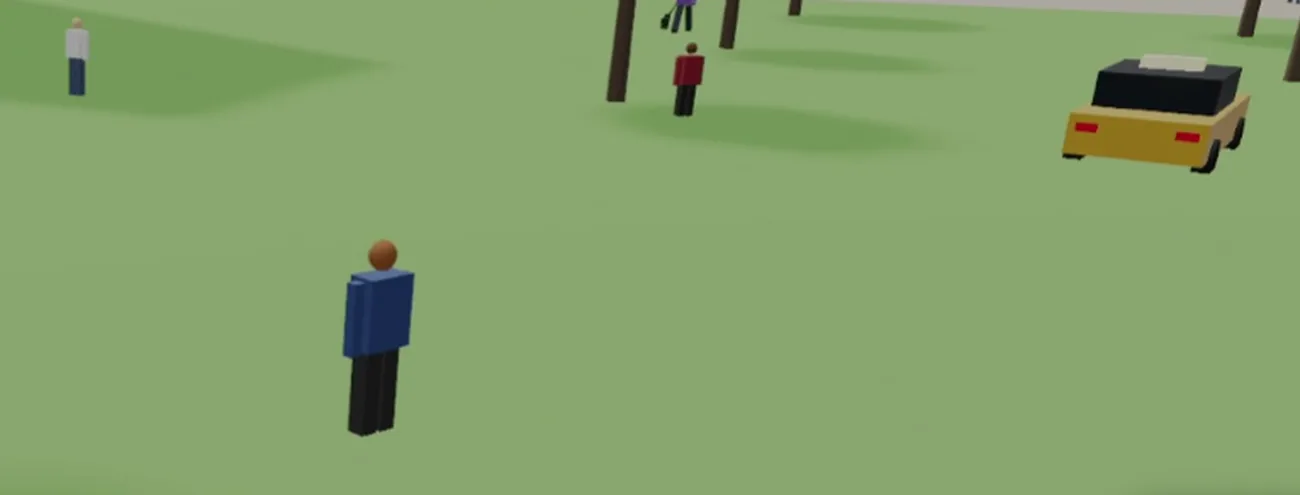
Medium is where the city started to behave. After the one fix for the loading issue it had Times Square, the park and the New York Public Library, colour in the buildings and windows. The cars respected traffic laws and people sat on the library stairs. The visuals were only a little better than low, but the logic was far better, so it got 4 out of 10.
High was one shot again and the step up was easy to see. The city was bigger than the previous ones by far, it included more of the landmarks the lower levels missed, and the movement was much smoother. It tried an Empire State Building that did not look much like the real one, and in walk mode we could move around without clicking. That earned it 6 out of 10.
From medium upwards the logic stayed about the same, and what changed was the graphic style compared with real life. Keeping every run one shot is what makes that difference visible.
Extra high used fewer tokens than high and passed every check
Extra high is the level that surprised us. It wrote about 4,500 lines of code from the one prompt, with no follow ups, and it used 502K tokens against high's 529K while passing all 20 checks where high passed 19. It cost $23, a dollar more than high, because it was thinking more, and it still built a better city on fewer tokens.
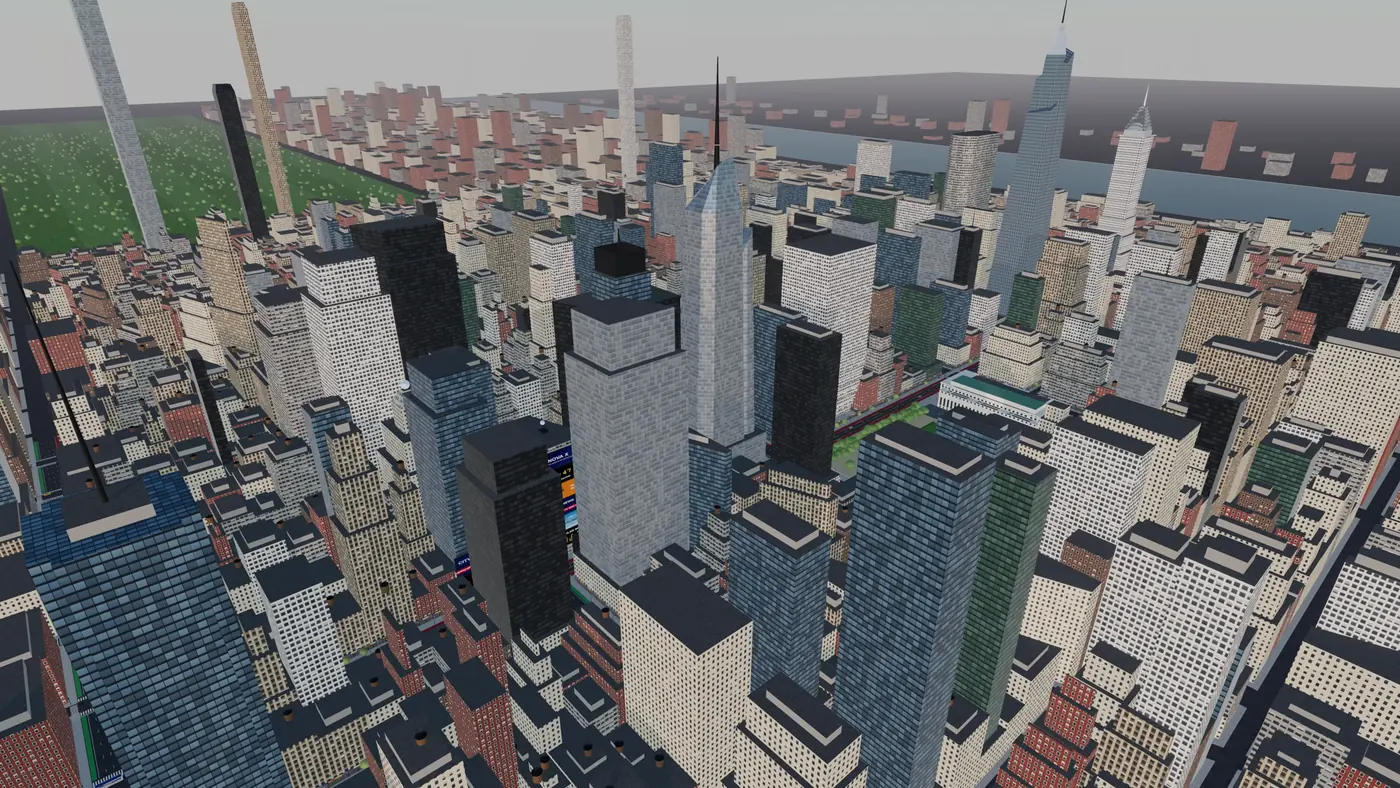
The graphics were far better than high. The night scene was the biggest jump, it built more buildings on the other side of the river, and the screen showed live counts of people, taxis, dogs and buses next to the frame rate. It was not perfect: there was some glitching and the screen blacked out for a moment. We first gave it 7 and then settled on 8 out of 10, because a few follow ups might make it more realistic but the one shot result was already good.
Max and Ultracode cost more without building a better city
Max matched extra high on the checks and on our score, at nearly double the time and the cost: 1 hour 52 minutes, 843K tokens and $45. Its output was very structured. It ran a lot of its own tests on the code and the city, kept opening Chrome to check everything worked, and published the result as a hosted artifact link anyone can open, not a page that only runs on your laptop.
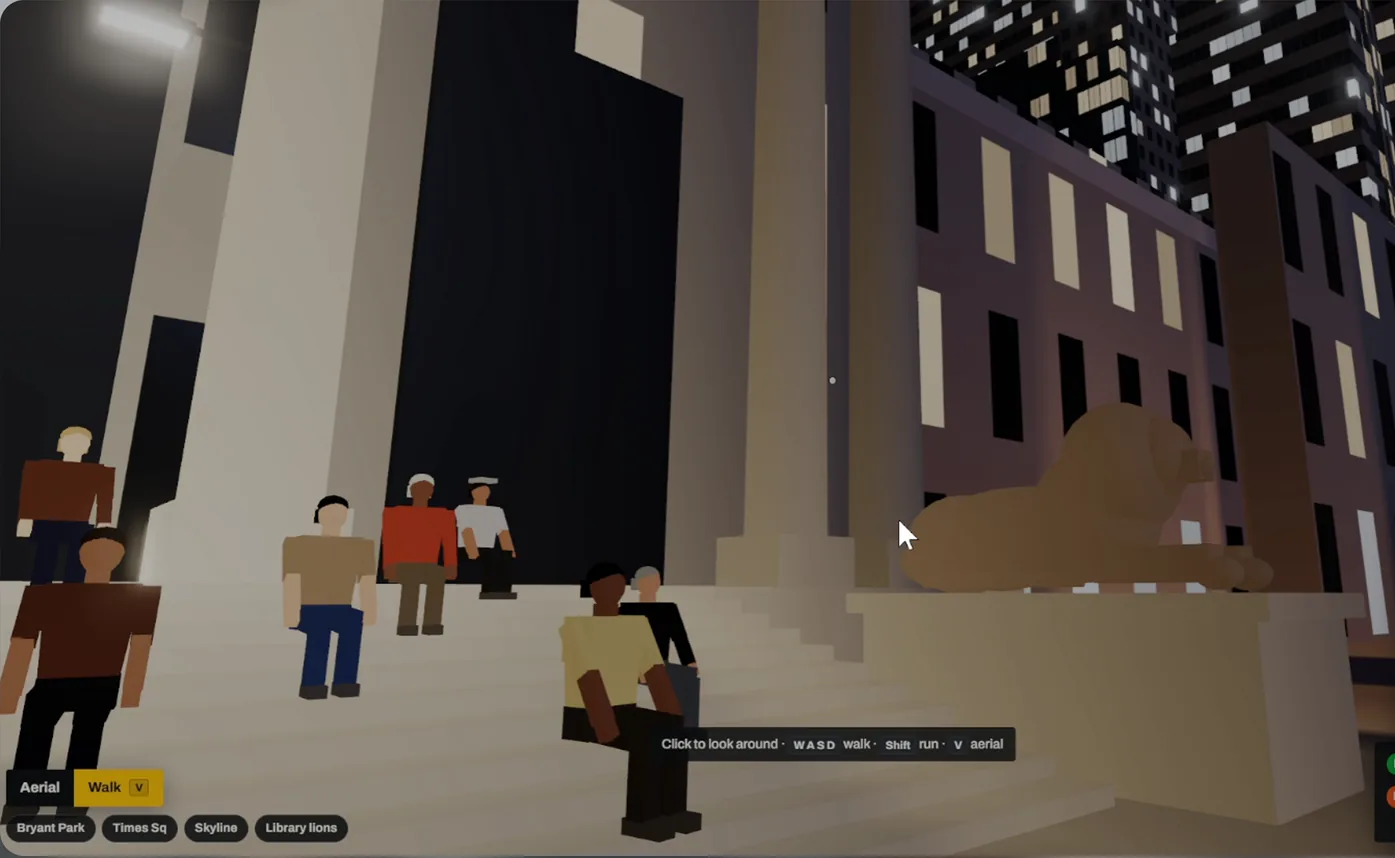
The detail was real. Max ended up with 539 people, 76 cars, 35 dogs and 10 buses, the water looked better, and the zoom was very smooth. The visuals were slightly better than extra high, but the score was the same 8 out of 10, so the extra $22 bought nothing on the scorecard.
Ultracode went the other way. It took the longest of all six, 3 hours 39 minutes, and cost $148 for a city we scored 6 out of 10, the same as high. It passed every check but had no real interface, only a few buttons telling you what to press. On a single build like this the extra agents did not help.
The token numbers explain why max can cost more tokens than Ultracode while working alone. Max thinks at max effort on every step, while Ultracode runs its agents at extra high, so max burned 843K tokens against Ultracode's 524K. Anthropic's own guidance on choosing an effort level warns that max may show diminishing returns and is prone to overthinking, and says to test it before adopting it broadly. Our run is one test, and it landed on the same side.
Which effort level to use for what
For a build this size we now leave Claude Code on extra high. It was the sweet spot in our test: every check passed, the joint top score, and fewer tokens than the level below it. Past extra high, the money stopped buying much.
Max earns its cost when one very hard problem needs a single model's full attention, done in a very careful way. Ultracode earns its cost when the codebase is very large and finishing fast matters more than the bill. For a small task, use a lower level.
Two practical notes. Opus 5.5 defaults to medium, so if you never touched the setting, that is the level your runs are on, and in our test medium needed a fix before it loaded. And Anthropic's effort documentation recommends an effort sweep on your own evals rather than carrying a setting over from an earlier model, which is exactly what this test is on a small scale.
The effort level is only one lever on cost. We wrote up the 11 fixes we use to cut Claude Code token usage, and there are more Claude Code tests in the Claude Code section of the blog. If you are building agents for your business and want help choosing the model and settings for each job, have a look at our custom AI agent builds.
The full walkthrough, with every city running side by side, is in Claude Code Built New York City at Every Effort Level on YouTube.
Questions people ask
How do you change the effort level in Claude Code?
Run /effort in a session to open a slider, or /effort followed by a level name to set it directly. You can also launch with --effort, set an environment variable, or move the effort slider in /model. Anthropic's model configuration page lists every method. Max applies to the current session only unless you set it through the environment variable.
What is Ultracode in Claude Code?
Anthropic describes Ultracode as a Claude Code setting rather than an effort level: with it on, Claude orchestrates dynamic workflows for substantive tasks at whichever effort level the session runs, according to the model configuration page. In our New York City test it ran at extra high with several agents, took 3 hours 39 minutes, cost $148 and scored 6 out of 10.
Is max effort worth it over extra high in Claude Code?
Not for a build like ours. In our test max and extra high both passed all 20 checks and both scored 8 out of 10, but max took 1 hour 52 minutes and $45 against 1 hour 4 minutes and $23. Max is worth it when one very hard problem needs a single model's full attention.
Claude Code Ultracode vs max effort: which is better?
In our test max was better. It scored 8 out of 10 for $45, while Ultracode scored 6 for $148. Max used more tokens, 843K against 524K, because it thinks at max effort on every step, while Ultracode ran its agents at extra high. Ultracode makes more sense for a very large codebase where speed matters more than cost.
What effort level does Claude Code use by default?
On Opus 5.5, Sonnet 5.5 and Haiku 5.5 the default is medium, and on most other models that support effort it is high, according to Anthropic's model configuration page. Running /effort auto clears a saved level and returns the model to its default.
Sources
Keep reading
11 Fixes That Cut Our Claude Code Token Usage by 70 Percent
Two installs, rtk and caveman, and nine built in Claude Code habits took our session from 100 percent used to 20. Each fix, its command and why it saves tokens.
Read the post
When should an AI agent hand off to a human?
Hand off when the agent keeps failing, when an action is risky or cannot be undone, or when the customer asks. What OpenAI, Anthropic and vendors say.
Read the post
What "plugs into your stack" means for AI agents
APIs, webhooks, OAuth and MCP are how an AI agent reads, acts and writes back in your CRM, calendar and helpdesk. What each one does and what to ask.
Read the post