
Claude Code MCP servers: add, scope and pay for them
Add a server, pick a scope, then check what it costs
You add an MCP server to Claude Code with one command, claude mcp add, and the scope you pick decides who gets it: just you in one project, your whole team through a committed .mcp.json, or you in every project. Since tool search became the default, a connected server costs only its tool names and instructions until Claude uses one of its tools, so the real cost is in large tool results and in servers you never needed.
Anthropic's MCP documentation gives the plainest test for when a server is worth adding: connect one "when you find yourself copying data into chat from another tool, like an issue tracker or a monitoring dashboard." If you are not doing that, you probably do not need it yet. If you want the protocol itself explained first, the guide to what plugs into your stack covers how MCP sits alongside APIs and OAuth.
If you are rolling Claude Code out to several developers and want one sensible MCP setup for all of them, we can help you plan it. Book a call with GenovaFlow AI
Three ways to add a server with claude mcp add
Every server you will find comes in one of three shapes, and each has its own form of the command. A remote server gives you a URL, a local server gives you a command to run on your machine, and setup instructions written for another app give you a JSON block.
A remote server from a URL
Remote servers run on the vendor's side, and the docs call HTTP the recommended option for them. The older SSE transport is deprecated. Pass a header if the server needs a token:
claude mcp add --transport http notion https://mcp.notion.com/mcp

claude mcp add --transport http secure-api https://api.example.com/mcp \
  --header "Authorization: Bearer your-token"
A local server from a command
Local servers run as a process on your machine. Everything after the double dash goes to the server untouched, so its own flags are not mistaken for Claude Code's. This is the Airtable example from the docs:
claude mcp add --env AIRTABLE_API_KEY=YOUR_KEY --transport stdio airtable \
  -- npx -y airtable-mcp-server
A JSON block written for another app
Instructions written for Claude Desktop or Cursor often give an mcpServers block. Pass the object inside it to add-json. One trap from the same page: an entry with a url but no type fails, because Claude Code reads an entry without a type as a local server.
claude mcp add-json example '{"command":"npx","args":["-y","@example/mcp-server"]}'After adding, claude mcp list shows every server with a health status, claude mcp get <name> shows one in detail, and /mcp inside a session shows what is connected and how many tools each server brings. claude mcp remove <name> deletes a server, and for a remote one it also deletes the sign in tokens Claude Code stored.
Pick the scope by who should get the server
The scope answers one question: who should have this server? Claude Code has three scopes, and local is the default when you do not pass --scope.
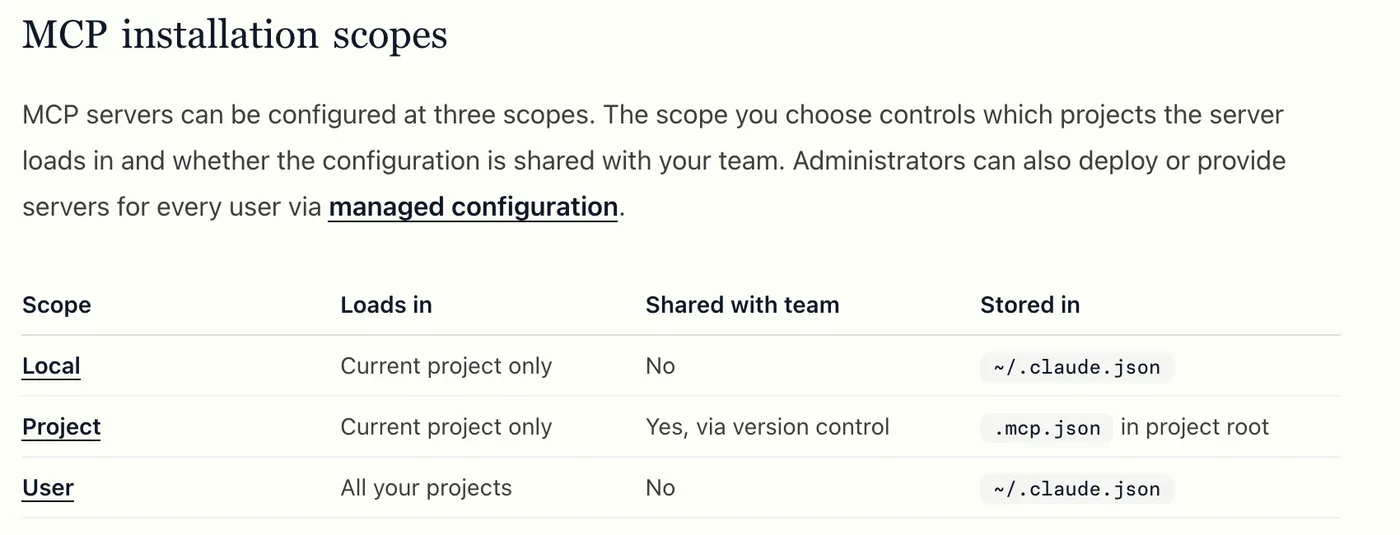
- Local loads in the current project only, stays private to you and is stored in
~/.claude.jsonunder that project's path. Use it for experiments and for servers that carry your own credentials. - Project loads in the current project for everyone, because it lives in
.mcp.jsonat the project root and goes into version control. - User loads in all your projects, stays private and is also stored in
~/.claude.json. Use it for tools you reach for everywhere.
That table also tells you where the config file lives. Personal servers, local and user alike, are in ~/.claude.json in your home folder. Shared ones are in .mcp.json in the repository. When the same name appears in more than one place, the precedence order is local, then project, then user, then plugin servers, then claude.ai connectors, and the winning entry is used whole rather than merged.
A connected server costs its tool names, not its whole tool list
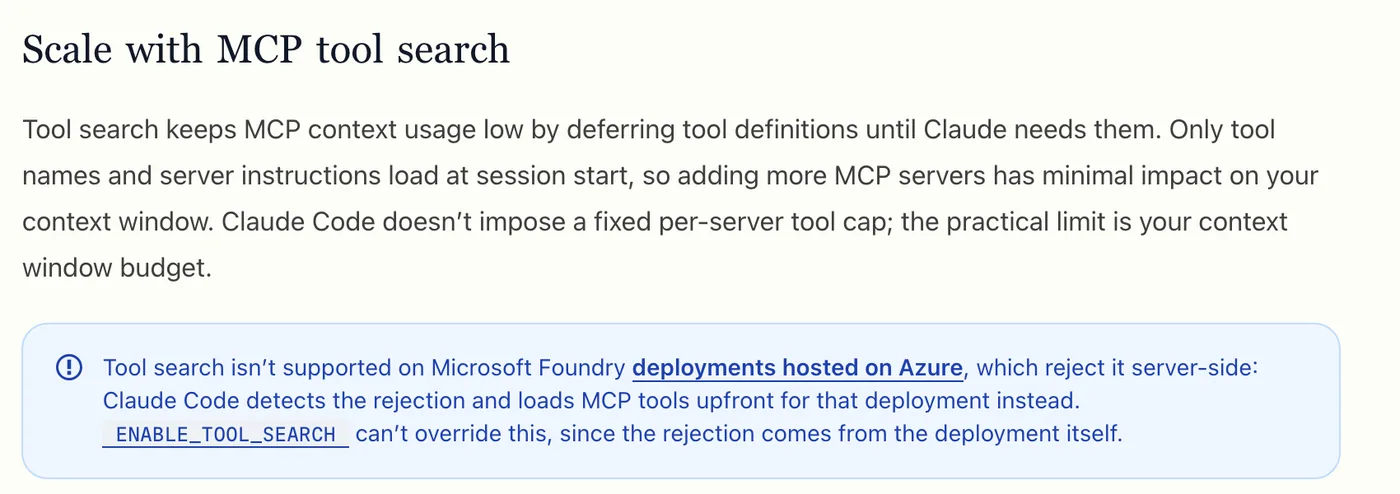
Tool search changed the cost of MCP in Claude Code. The docs say it keeps MCP context usage low by deferring tool definitions: only tool names and server instructions load at session start, and Claude pulls in a full definition when it needs that tool. Claude Code sets no fixed cap on tools per server; the practical limit is your context window.
We saw the effect in our own setup. In the /context run from our token usage fixes, 317 MCP tools were listed as loaded on demand at 0 tokens, while system tools took 13.3k. The eleven fixes that cut our Claude Code token usage start with that same command, because it shows where the window actually goes.
You can change the behaviour with ENABLE_TOOL_SEARCH. Left unset, MCP tools are deferred. Set to auto, tools load upfront while their definitions total under 10 percent of the context window and are deferred above that; auto:5 moves the line to 5 percent, and false loads everything upfront. The configuration table also lists where tool search is unavailable, such as Microsoft Foundry deployments hosted on Azure, which load tools upfront whatever you set.
For the few tools Claude needs on every turn, set "alwaysLoad": true on that server, and accept that each upfront tool takes space for the whole session. Deferral also protects the prompt cache: with tools deferred, Claude Code keeps the tool list from the first request, so a server connecting halfway through a session does not force a cache rebuild. With tools loaded upfront, adding or removing a server does.
Large tool results are capped at 25,000 tokens by default
The bigger risk to your context is what a tool sends back. A database query or a page scrape can return far more text than you need, and all of it rides along in every later turn. Claude Code warns when an MCP tool result passes 10,000 tokens, caps it at 25,000 tokens by default, and saves anything larger to a file that Claude reads only when it needs to.
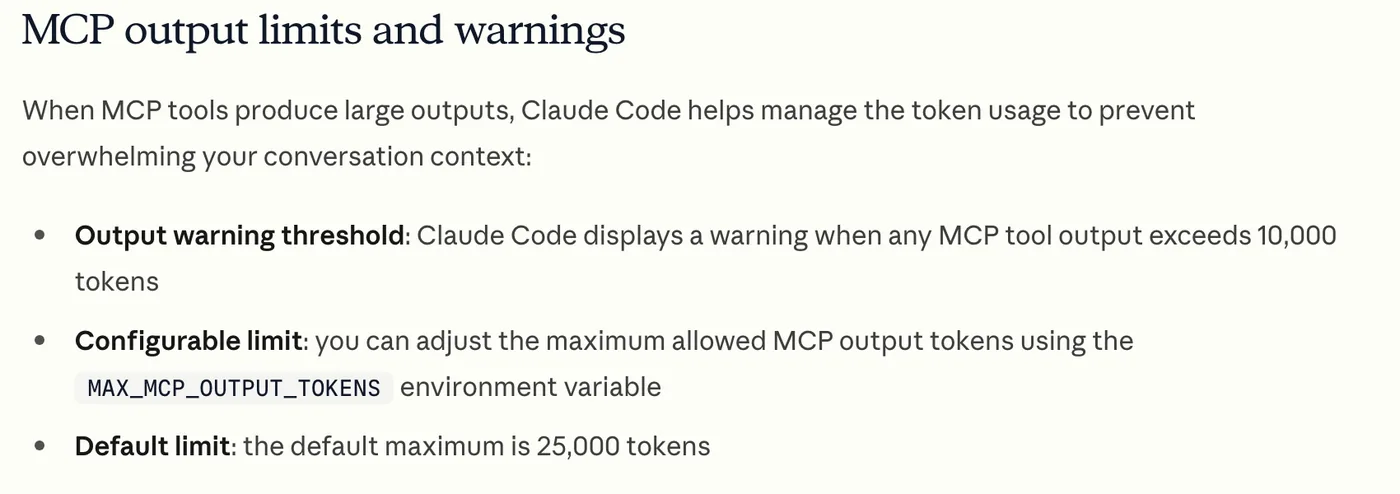
You can raise the cap for a session with an environment variable, which the docs show as export MAX_MCP_OUTPUT_TOKENS=50000 before starting claude. Raise it only for a server whose large answers you genuinely need, such as a full schema. A text result over 50,000 characters is saved to a file whatever the token setting, unless the server declares its own limit.
Choose servers by trust and reach, and prefer a CLI when one exists
Picking servers is mostly picking whom to trust. The docs warn you to verify each server before connecting it, because servers that fetch outside content can expose you to prompt injection. A local server is a program running with your own permissions, and the protocol's security best practices list arbitrary code execution and data exfiltration among the risks of an untrusted one. Prefer the server published by the vendor of the system itself, and check the command a local server runs before you add it.
Give each server the least access its job needs. The database example in the docs uses a read only database user "so the queries Claude runs can't modify data", and the same idea applies to a GitHub token limited to a few repositories or a CRM account without delete rights. The integration guide explains why a limited OAuth key beats a shared password for the same reason.
Then ask whether you need a server at all. Anthropic's costs guide says command line tools such as gh, aws, gcloud and sentry-cli are still more context efficient than MCP servers, because they add no tool listing, and Claude Code can already run them. Keep MCP for systems with no good CLI. To review what you have, toggle unused servers off in /mcp, which keeps their configuration, and on a Pro, Max, Team or Enterprise plan check /usage, which attributes recent usage to individual MCP servers.
Teams adding Claude Code across many developers usually need the same three decisions made once: which servers go in the shared .mcp.json, which stay personal, and which credentials each gets. That is part of the work we do in custom AI agent builds, and more Claude Code guides are in the Claude Code section. For where Claude Code fits beside workflow tools such as n8n, see the comparison of AI automation tools.
Questions people ask
Where is the Claude Code MCP config file?
Servers you add at the default local scope, and at user scope, are stored in ~/.claude.json in your home folder; local ones sit under the project's path inside it. Project scope servers are stored in .mcp.json at the root of the repository, which you commit so the team shares them. The scopes table in Anthropic's docs lists all three.
Do MCP servers use tokens in Claude Code?
Some, but far fewer than they used to. With tool search, the default, only tool names and server instructions load at session start and a full definition loads when Claude uses the tool. The larger cost is tool results: Claude Code warns above 10,000 tokens and caps results at 25,000 by default. Run /context to see your own numbers.
What is MCP tool search in Claude Code?
Tool search is how Claude Code avoids loading every MCP tool definition into the context window. It loads tool names first and lets Claude search for and load a tool's full definition when a task needs it. It is on by default on supported models, and the ENABLE_TOOL_SEARCH variable can switch it to a threshold mode or off, as the configuration table describes.
Should you use an MCP server or a CLI with Claude Code?
Use the CLI when a good one exists. Anthropic's costs guide says tools such as gh, aws, gcloud and sentry-cli are more context efficient than MCP servers because they add no per tool listing. Use an MCP server for systems that have no CLI, or where the server gives Claude structured access you would otherwise have to script.
How do you remove an MCP server from Claude Code?
Run claude mcp remove <name>; for a remote server this also deletes the sign in tokens Claude Code stored for it. If you only want it off for a while, toggle it off in the /mcp panel instead, which stops Claude Code connecting to it but keeps the configuration so you can switch it back on later.
Sources
Keep reading

11 Fixes That Cut Our Claude Code Token Usage by 70 Percent
Two installs, rtk and caveman, and nine built in Claude Code habits took our session from 100 percent used to 20. Each fix, its command and why it saves tokens.
Read the post
What "plugs into your stack" means for AI agents
APIs, webhooks, OAuth and MCP are how an AI agent reads, acts and writes back in your CRM, calendar and helpdesk. What each one does and what to ask.
Read the post
n8n vs Zapier vs Make for AI workflows, and where Claude Code fits
How n8n, Zapier and Make price AI workflows, what n8n's license lets you self host, and when a coded agent like Claude Code is the better tool.
Read the post