
Claude Code skills: build one for a task you repeat
A skill is a folder of instructions Claude loads when the task matches
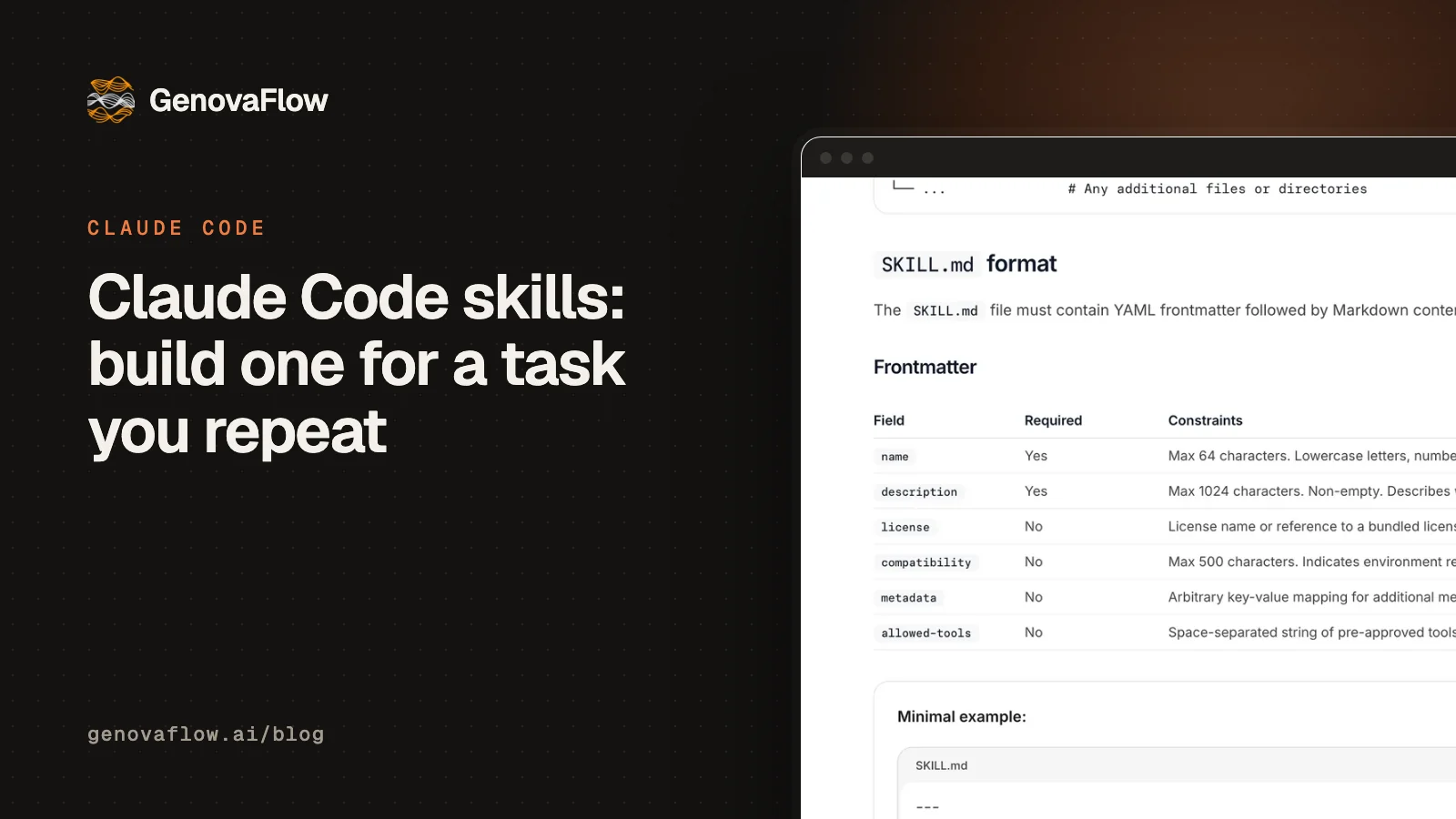
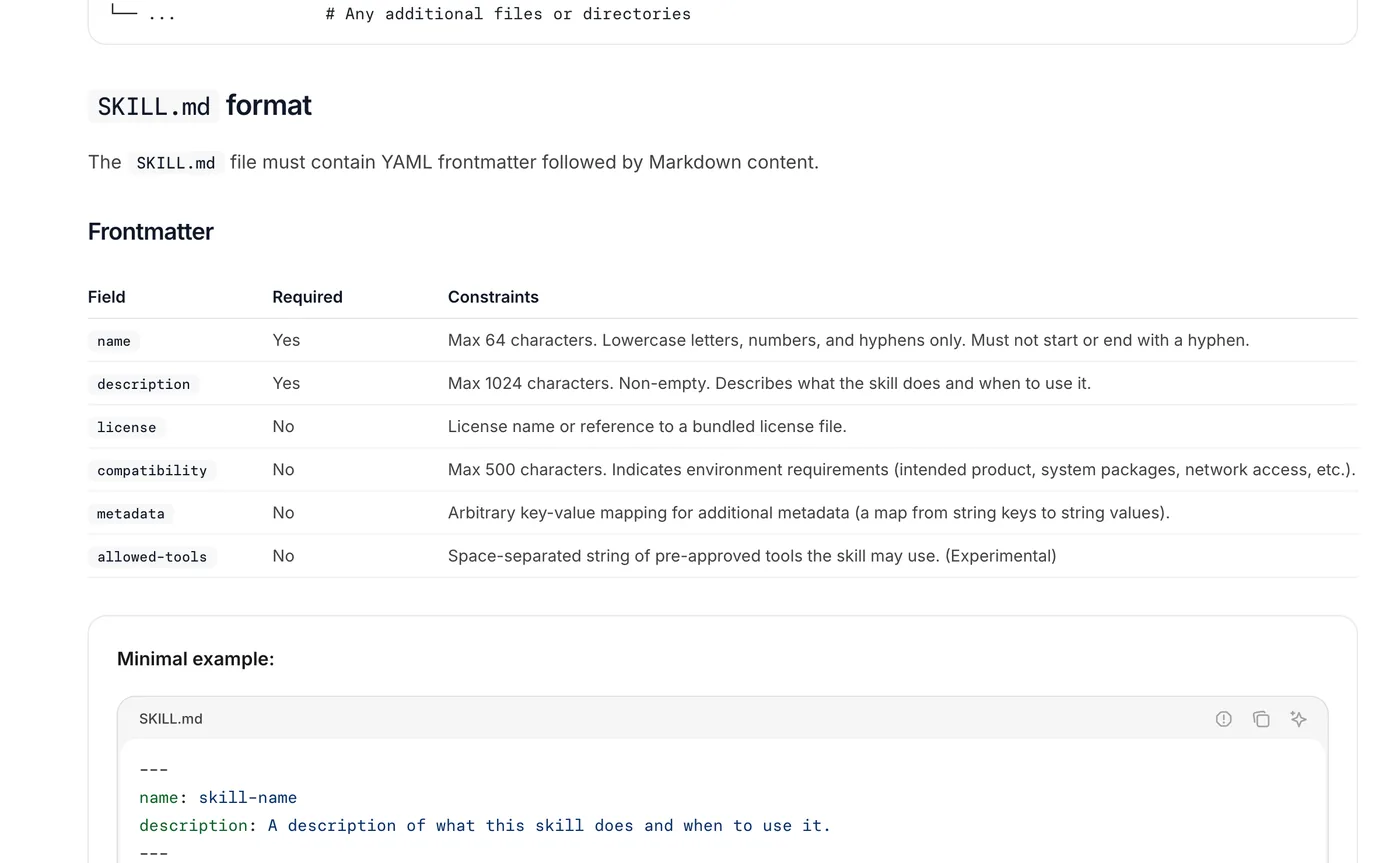
A Claude Code skill is a folder containing a SKILL.md file: a few lines of frontmatter that say what the skill does and when to use it, then the instructions Claude follows. Claude keeps only the name and description in view, loads the rest when a request matches, and you can also run it yourself as a slash command, as Anthropic's skills docs describe.
That makes a skill the right home for a job you repeat. Anthropic's rule of thumb is to create one when you keep pasting the same instructions, checklist or procedure into chat, or when a section of CLAUDE.md has grown into a procedure rather than a fact. Old custom commands still work, because the docs say they were merged into skills: .claude/commands/deploy.md and .claude/skills/deploy/SKILL.md both create /deploy.
We run on them ourselves. GenovaFlow's Content Engine, the tool that researched this article, keeps 21 skill folders in its .claude/skills directory for the stages of its research and writing pipelines, and the blog pipeline that produced this post is a single SKILL.md. More on the rest of Claude Code is in the Claude Code category.
If your team repeats the same task every week and wants it written down once, we can help you choose the first one. Book a call with GenovaFlow AI
Claude loads a skill in three steps, which keeps long ones cheap
Skills are built around what Anthropic calls progressive disclosure. In its engineering post introducing Agent Skills, Anthropic explains that at startup the agent preloads the name and description of every installed skill into its system prompt, reads the SKILL.md body only when the skill is relevant, and opens any further files the body points to only when it needs them.
The open Agent Skills specification puts rough sizes on each step: about 100 tokens of metadata per skill, a body under 5,000 tokens, and other files loaded as needed, with SKILL.md kept under 500 lines. Because the format is an open standard, the same folder works in more than one tool; Cursor, for one, loads skills from .claude/skills for compatibility, according to its skills docs.
Choose a skill, CLAUDE.md, a hook or an MCP server by when it must load
Claude Code has four places to put what you know, and the difference between them is when each one reaches the model. The table sums up the skills docs, the memory docs and the costs guide.
| Put it in | When it loads | Good for |
|---|---|---|
| CLAUDE.md | Every session, in full | Facts Claude needs all the time: commands, conventions, layout |
| A skill | When a request matches its description, or when you type its name | Procedures and reference that matter for some tasks |
| A hook | At fixed events, every time, as a shell command | Rules that must hold, such as running the linter after each edit |
| An MCP server | Tool names at start, a tool's full definition when Claude uses it | Live access to another system, such as a CRM or a database |
The line that matters most is advisory versus guaranteed. A skill, like CLAUDE.md, is instructions Claude reads and applies with judgment, while the best practices page calls hooks deterministic, so anything that must happen with zero exceptions belongs in a hook. MCP servers are different again: they give Claude new actions rather than new knowledge, which what plugs into your stack means explains for business systems.
Build one: turn sales call notes into a proposal draft
Here is a skill for a job many service businesses repeat every week: turning the notes from a sales call into a first draft proposal in the house format. It is a worked example built from the fields Anthropic documents, not a client's file, and it takes four steps.
- Create the folder inside the project, so everyone who clones the repository gets it:
mkdir -p .claude/skills/call-to-proposal. For a skill only you use across every project, put it under~/.claude/skills/instead. - Write
SKILL.mdwith a description that names the job and the words people will actually type. - Put the template the proposal must follow in
template.mdbeside it, so it loads only when the skill runs. - Test it in a fresh session both ways: ask in plain words, then type
/call-to-proposal.
---
name: call-to-proposal
description: Turns sales call notes or a call transcript into a first draft client proposal in our house format. Use when the user pastes call notes or a transcript and asks to write it up, draft a proposal, a quote or a scope, or send something to the client.
argument-hint: [path to notes]
---

Write a first draft proposal from the call notes in $ARGUMENTS, or from the notes in this conversation.

1. Follow the headings and order in [template.md](template.md) exactly.
2. Use only facts that appear in the notes. Quote any price exactly as written there; never estimate one.
3. Keep it to one page, in plain words, addressed to the client by name.
4. End with a section called Open questions listing anything the notes do not settle.
5. Save the draft as proposals/<client>-draft.md and show the open questions in chat.
Two choices in it are deliberate. The description leads with what the skill does and then lists the phrases a person would type, because it is the only part Claude sees before deciding to load the skill. And the price rule is written as a standing instruction, because the docs note that Claude Code adds the skill to the conversation once and does not read the file again on later turns.
The description decides whether the skill ever runs
Most skills that seem to do nothing never loaded. Claude Code lists every skill's name and description in context, cuts each description plus its when_to_use text at 1,536 characters, and gives the whole listing a budget of 1% of the model's context window; when the listing overflows, it drops the descriptions of the skills you use least first, according to the skills docs.
So write the description like the search a colleague would type. The Agent Skills spec contrasts a good description, which says what the skill extracts and when to use it, with a poor one that reads only "Helps with PDFs." If a skill still does not trigger, the troubleshooting list is short: check that the description holds the words users say, ask Claude What skills are available?, invoke it directly with its slash command, and run claude plugin validate .claude/skills to catch frontmatter that does not parse.
Keep anything that sends or deploys manual
A skill that only reads and drafts can load on its own, but one that sends, deploys or deletes should not. Setting disable-model-invocation: true means only you can start it, by typing its name, and the docs give the reason plainly: "You don't want Claude deciding to deploy because your code looks ready."
---
name: send-proposal
description: Emails an approved proposal to the client
disable-model-invocation: true
---
The opposite setting, user-invocable: false, hides a skill from the slash menu so only Claude loads it, which suits background knowledge such as how an old system works. allowed-tools approves in advance the tools a skill needs during the turn it runs, and that grant clears when you send your next message.
Prove the skill does better than no skill
A skill that fires is not yet a skill that helps. Anthropic's docs say it directly: seeing a skill trigger tells you Claude found it, not that it did what you intended. The check is a baseline comparison: run a few realistic prompts in a fresh session with the skill, run them again with the skill set to off in skillOverrides, and compare the two sets of answers, since leftover context from writing the skill would hide gaps in it.
Anthropic's skill-creator plugin automates that loop inside Claude Code. It stores the test prompts in evals/evals.json, runs each case in its own subagent, grades the output, and reports pass rate, time and tokens with and without the skill, so you can judge whether the improvement is worth the extra tokens.
/plugin install skill-creator@claude-plugins-officialThen ask Claude to evaluate the skill with skill-creator. For a skill that ships in a plugin, claude plugin eval runs the same comparison and exits with an error below a threshold you set, which is enough to fail a build when a model update makes the skill worse.
Install other people's skills the way you would install their code
Skills can carry scripts as well as text, so a skill from a stranger is code from a stranger. Anthropic's advice in its engineering post is to install skills only from trusted sources and to audit a less trusted one thoroughly before use. In practice that means reading the SKILL.md, every bundled script, and any allowed-tools line before the first run.
Run /doctor now and then as well. Its checkup compares unused skills, MCP servers and plugins with their context cost, per the skills docs, so a folder of collected skills does not quietly fill every session's listing.
If the repeated job is bigger than one person's afternoon, such as a weekly report that pulls from three systems, a skill is often the first step and an agent the second. What agentic AI is and how it differs from a chatbot explains that difference, our custom AI agents are built for the second step, and our eleven fixes for Claude Code token usage show why moving instructions from CLAUDE.md into skills saves tokens.
Questions people ask
Where are Claude Code skills stored?
Personal skills live in ~/.claude/skills/<skill-name>/SKILL.md and load in all your projects on that machine. Project skills live in .claude/skills/<skill-name>/SKILL.md inside the repository and load for anyone working there once committed. Organizations can deploy skills through managed settings, and plugins carry their own skills folder, per Anthropic's skills docs.
Does Claude Code use skills automatically?
Yes, by default. Claude sees every skill's name and description and loads the full skill when your request matches, so you never have to name it. You can stop that for one skill with disable-model-invocation: true, which leaves it available only as a slash command, a sensible setting for anything that sends or deploys (skills docs).
What is the difference between a skill and a slash command?
Very little now. Anthropic merged custom commands into skills, so a file at .claude/commands/deploy.md and a skill at .claude/skills/deploy/SKILL.md both create /deploy and work the same way. A skill adds a folder for supporting files, frontmatter that controls who can invoke it, and automatic loading when a request matches (skills docs).
Are Claude Code skills free?
Skills are plain files, so writing or sharing one costs nothing, and the format is an open standard. Using one costs tokens like anything else in a session: the name and description sit in context all the time, and the body counts once it loads. On paid plans, /usage shows how much of your recent usage went to each skill, per the costs guide.
Can you use the same skill in other tools?
Often, yes. Claude Code skills follow the open Agent Skills standard, and Cursor loads skills from .claude/skills for compatibility. Claude Code adds extensions of its own, such as invocation control and running a skill in a subagent, which other tools may ignore, so keep the core instructions in the body and the standard fields.
Sources
Keep reading

11 Fixes That Cut Our Claude Code Token Usage by 70 Percent
Two installs, rtk and caveman, and nine built in Claude Code habits took our session from 100 percent used to 20. Each fix, its command and why it saves tokens.
Read the post
What agentic AI is and how it differs from a chatbot
Agentic AI is a model that picks its own next step and uses tools in a loop. How it differs from a chatbot or a workflow, with a worked example.
Read the post
What "plugs into your stack" means for AI agents
APIs, webhooks, OAuth and MCP are how an AI agent reads, acts and writes back in your CRM, calendar and helpdesk. What each one does and what to ask.
Read the post